Ensuring that content that is important to the function of the university or that is a frequent target of searches/AI questions is correct
Ensuring that we are not doing accessibility remediation work to pages or content that ultimately don’t need to be kept
Goals of the content review do NOT include:
Ensuring all content on every page is perfect
Doing large content revisions or aesthetic overhauls of pages or sites
Guidelines for the Content Review
The project team will be reviewing Sites and pages for the following, and we recommend anyone remediating their Site on their own or ahead of our process review for these as well:
Facts or factual references to UMBC policies, processes, or guidelines
Content referencing 2023 or older that is not clearly meant to be historical
Example to keep: A page clearly labeled “history of [site name]” with a timeline going back further than 2023
Example to flag for archive: A page for a one-time event that happened in 2019
Example to flag for delete: A list of “upcoming trainings” that are all from 2019
Pages not edited or updated since 2023 or earlier
Is this content truly evergreen content that doesn’t need to be updated frequently, if at all?
Is this essential content to the function of this unit (meaning it should be kept very accurate), or just “nice to have” content?
Staff listings, phone numbers, email addresses, and any other form of contact listed
Media (images, videos, audio files) and external files (PDFs, google files, etc)
Anything kept during this phase will need to be remediated (where necessary) in the next phase
Links all work and direct to the correct place (Silktide’s content review section checks for this!)
Additional Content Review Guidance (added February 2026)
The following is some additional recommendations based on common findings across a variety of UMBC Sites:
Are there references to departments, offices, etc that either no longer exist, or have been re-named?
In particular, watch out for:
i3b (Initiatives for Identity, Inclusion and Belonging) is now Student Engagement and Belonging, or you can refer to the individual centers:
Retriever Support Services is now its own office and includes Retriever CARE, Retriever Essentials, Essential Needs and Connections, Veteran and Military Affiliated Affiliated Services
Does your site currently contain PDFs, files, or website content owned by another department or website?
Instead of maintaining another department’s content, reduce to the essential information that can be kept “evergreen” and include a link to the full content or files
“Frequently found” types of this content, and where we suggest to link to instead:
Ask what content should be posted directly to the website
What could instead be re-developed into a tagged myUMBC feed that will auto-import to the website?
Pro-tip: Did you know you can have as many myUMBC feeds on your Site as you’d like?
You can set up myUMBC feeds to only import in posts or events that are tagged in specific ways, meaning you can curate a wide variety of feeds that will live “evergreen” on your website. Learn more about how to set up a myUMBC feed here!
myUMBC feeds will also auto-import the accessibility features given to the myUMBC post or event, meaning you don’t have to worry about ensuring the content is accessible twice
Archiving & Deleting
As a part of the Content Review, our recommendations will likely include pages that we want to consider archiving or deleting.
Review your pages through the Sites back-end list of pages, not your navigation on the live website. Most Sites have pages that were removed from the navigation but never deleted or marked private. These pages are still live, and still feed to Google and AI.
Generally, the more pages your Site has, the more should be marked for archival and deletion. We recommend that Sites strive to remove 25% of pages (the primary target should be pages no longer available through the Sites’ navigation), but this is a very loose guideline. Use your best judgment! If your Site only has 6 pages, this may not apply at all.
What kinds of content should be kept for archival, ideally?
“Records of enduring value made or received officially by UMBC and for other materials of historical value related to the function and history of UMBC”
Questions to ask as guideposts:
Does it have historical content about UMBC?
Is it content about the function of UMBC?
Is this content about cultural events, or the development/growth of UMBC?
Does this content offer representation of student life, community engagement, or faculty research?
Could this content be relevant to compliance, legal claims, or institutional accountability?
Some content might be of archival value but may be better off in the actual Library physical archive (or their curated digital archive) than being stored on Sites. Contact speccoll@umbc.edu about any of the below:
Content about or from individual faculty, staff, or students
“What do I do if I don’t think something should be archived, but my content owner is adamant it be kept?”
Lead with curiosity and generosity, our goal is to get this process completed, not have it be perfect!
Inquire if it can be stored elsewhere: Can they/you/the department download it and keep it on Box instead?
If it can’t be stored elsewhere, can it be made private or password protected on the website instead?
Ultimately, it’s okay to archive something that isn’t a perfect candidate for archiving. Archiving a Sites page isn’t permanent, and you can always revisit this page or conversation later!
Deleting Guidance
What should be deleted instead of archived:
Stub pages (very low content); in some cases, we’ve seen a bunch of small pages that should be condensed into one larger page and the smaller (stub) pages deleted
Blank or “coming soon” pages
If these have been in “coming soon” for more than six months, we recommend deleting them
If these have been created in the past six months, we recommend moving them into draft status
Any old content pages that are no longer relevant or needed and not of archival value
Accessibility Review Phase
Goals of the Accessibility Review
UMBC’s goal is to comply with WCAG 2.1 AA. To accomplish this, the Accessibility Review goals include the following:
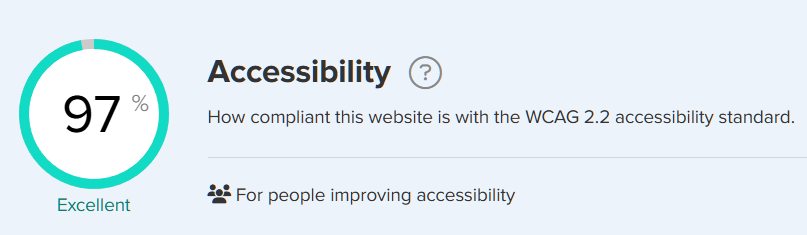
A screenshot of Silktide’s Accessibility module, showing a site with an accessibility score of 97% compliant to WCAG 2.2.
An Accessibility score of at least 90% on Silktide (keep in mind this only factors in the automated checks) with:
No red or orange flags remaining
No A or AA flags remaining (AAA are optional unless they are red or orange)
A screenshot of accessibility checks in Silktide, showing an orange flag A check and a red flag AA check remaining.
A or AA assisted checks on Silktide have been either:
Addressed and cleared
Checked and “ignored” on Silktide as not applicable
A screenshot of Silktide’s accessibility checks showing an optional AAA check.
AAA checks on Silktide are optional (unless they are red or orange flags) but best practice, and we recommend incorporating as many as possible
Any element that Silktide cannot evaluate for has been manually evaluated and remediated where necessary. Commonly this includes (non-exhaustive list):
External files owned by UMBC: PDFs, Google files, Microsoft files, etc